David Fox — UK sales and marketing lead for Archiware and representative of JPY, the UK distributor — joins Ray Quattromini of Fortuna Data to walk through how Archiware P5 solves the real-world archive, backup, and data lifecycle challenges facing media companies, universities, law enforcement, and AI teams.
Host: Ray Quattromini, Fortuna Data · Guest: David Fox, Archiware / JPY
David has worked in the creative technology space since a computer science degree in the early 1990s, spanning pre-press, publishing, audio and video. He works directly for JPY — the UK distributor for Archiware — and also handles UK sales and marketing for Archiware GmbH, the Munich-based developer of the P5 backup, archive, and replication platform.
Post-production studios, broadcast facilities, and VFX houses share a universal problem: their primary storage — the fast spinning disks and SSD cache that editors work from — is always full. As soon as one project wraps, another one arrives. And crucially, finished projects cannot simply be deleted. The data has to be kept, often indefinitely, but it no longer needs to sit on expensive, high-performance storage.
This is the problem that Archiware P5 was built to solve. As David explains it, media organisations are running two parallel workflows simultaneously: backup — copying live data every day as insurance against hardware failure or disaster — and archive — moving completed projects off primary storage into cold storage to free up capacity for the next job.
These are fundamentally different operations with different goals, and conflating them is a common mistake. A backup is a safety net. An archive is a workflow tool for managing capacity. P5 handles both, along with a third function: replication — synchronising data between different hosts, platforms, or locations.
"Hot storage is the spinning disks and the SSD cache for editing. Cold storage is where you push stuff to. So that's the archive workflow. The cold storage we support is LTO tape and cloud — whereas LTO is more popular."David Fox, Archiware / JPY

Fortuna Data works with JPY and Archiware to help media teams, IT teams, and MSPs find the right tape and archive solution. Whether you're evaluating LTO tape for the first time or looking to migrate an existing archive, we can help you size and specify the right setup.
Archiware P5 is a software product from Archiware GmbH, a specialist software house based in Munich with around 20 to 30 staff. It is focused entirely on doing one thing extremely well: backup, archive, and replication for environments where storage is large, data is valuable, and workflows are demanding.
P5 is platform-agnostic. It runs natively on Windows, macOS, Linux, and FreeBSD, and is available directly in the app stores for QNAP and Synology NAS devices. For environments where running software directly on the storage OS is not permitted by the vendor, P5 can be deployed inside Docker, making it highly portable. Many proprietary storage appliances ship with P5 pre-installed because they run embedded Linux under the hood.
Critically, P5 is hardware-agnostic for tape. It supports LTO drives and tape libraries from every manufacturer — any generation from LTO-1 through to LTO-10 — meaning organisations are not locked into a specific hardware vendor's ecosystem. JPY works alongside all major LTO drive and library manufacturers, and because P5 supports all of them, it fits naturally into whatever hardware a partner or customer already has in place.

David is precise about the difference between backup and archive because many organisations blur the two — and the operational consequences matter.
A backup is a rolling copy of all live data, updated daily. Its purpose is recovery: if the primary storage fails, gets corrupted, or a building burns down, the backup allows the organisation to restore its working environment. It is insurance.
An archive is a deliberate, permanent move of data that is no longer actively needed on primary storage — but must be retained. In post-production, this typically means completed project folders: the raw 4K or 8K footage, the full audio stems, the graphics assets. Once a project is delivered, that data has no reason to live on expensive NVMe or spinning disk, but it absolutely cannot be deleted. It goes to cold storage — tape or cloud — and the index in P5 means it can be found and retrieved at any point.
The third function, P5 Synchronize, sits alongside these two: it replicates data between hosts, across platforms, and to cloud buckets. Where backup and archive involve tape-based workflows, Synchronize is a file-and-folder replication tool — simpler, but exactly what many organisations need for a second copy on a remote server or a cloud bucket that mirrors a local folder.

One of the most practically valuable features in P5 is its Data Lifecycle Management capability — previously known as Data Mover — which handles the migration of archive data from older LTO tape generations to newer ones.
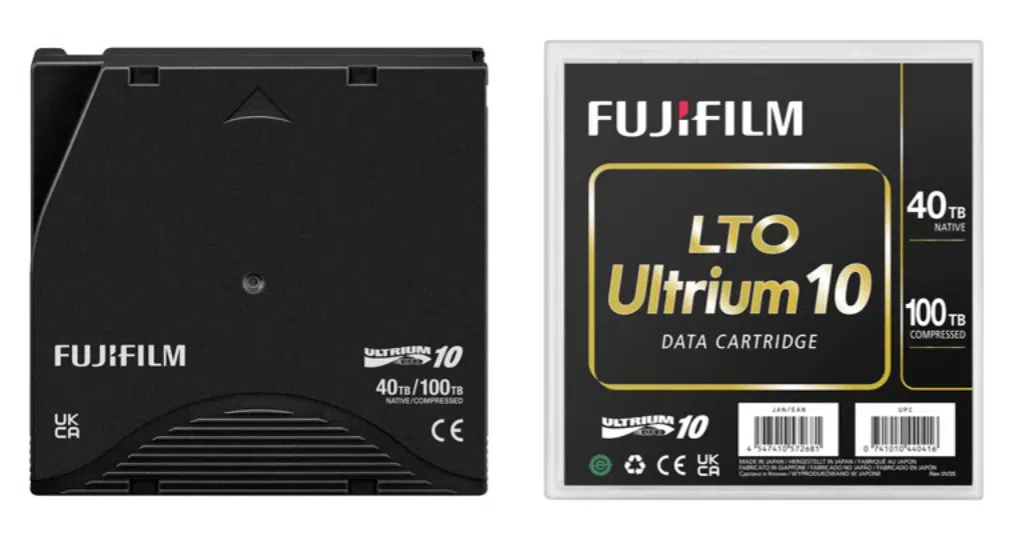
Every few years, a new generation of LTO tape is released with significantly higher capacity. LTO-10 holds 30TB native (up to 75TB compressed) on the standard cartridge, or 40TB native (up to 100TB compressed) on the enterprise cartridge. Organisations that have been archiving to LTO-8 or LTO-9 tapes face a challenge: how do you migrate years of archive data to the newer format without manually restoring and re-archiving everything?
P5 handles this automatically. It reads through the existing index — which may contain metadata and thumbnails for millions of individual media files — locates each file on the older tapes, and writes it directly to the new LTO-10 drive. The index is updated to point to the new tape locations, while the original tapes remain intact as a secondary insurance copy. Crucially, because LTO-10 holds significantly more data than LTO-8 or LTO-9, the consolidation ratio is excellent: multiple older tapes can be consolidated onto a single new tape.
"We go through the index, find each file on the older tapes, and write it to the newer drive, then point the index at the new version of that file. The index remains the same — your 1.5 million media files are still there — but now they're pointing to LTO-10 tapes instead."David Fox, Archiware / JPY
One of the most editor-friendly features in the latest version of P5 is EDL restore — introduced in version 8 — and it addresses a very specific pain point in the post-production conform process.
When a video editor works on a project, they typically work with proxy files: lower-resolution versions of the original footage that are small enough to edit at speed on a workstation. The original high-resolution files — 4K, 6K, or higher — are archived to tape at the start of the project because they are too large to keep on the editing server. Once the edit is complete, the editor needs those original files back for the final conform: the process of replacing all the proxy clips with the full-resolution originals for grading, finishing, and delivery.
An Edit Decision List (EDL) is a text file that describes the editing timeline in full — every clip used, every in and out point. P5 can read this EDL and use it to restore only the specific portions of the original footage that actually made it into the final cut. On a typical project, 80% or more of the original footage is never used in the final edit. EDL restore means you retrieve only what you need, from tape, automatically — rather than restoring the entire original shoot.
While P5 was built with media in mind, David describes a customer base that has broadened considerably over the years.
Media and entertainment remains the core market: post-production houses, VFX studios, broadcast facilities, and audio production companies. These organisations have always had large file sizes, demanding workflows, and the need to retain finished content indefinitely. They understand the economics of cold storage and the operational value of a well-managed archive.
Universities and research institutions are a growing segment. IT and science departments generate large volumes of data — research datasets, genomic data, simulation outputs — that follow similar patterns to media: actively worked on for a period, then retained permanently. Several major UK universities have deployed P5, often replacing older incumbent tape tools that were less intuitive to manage.
Law enforcement and CCTV is a particularly interesting and expanding use case. Police forces using body cameras, plus facilities managing large-scale CCTV networks in airports, shopping centres, and transport hubs, generate enormous volumes of video footage. 4K CCTV at scale means storage requirements that can exceed half a petabyte — and that data must typically be retained for 90 days before it can be deleted. P5 enables these organisations to move footage from primary storage to tape automatically, manage retention periods, identify which tapes can be recycled when content has expired, and reuse or decommission media at the end of its retention window.
AI and machine learning is an emerging use case that David sees growing rapidly. Training datasets for large language models and machine learning pipelines are enormous — and once a model has been trained, the training data itself is no longer needed on fast primary storage. It needs to be retained and retrievable, but does not need to be instantly accessible. LTO tape is a natural fit: low-cost per terabyte, long lifespan, and accessible via S3 through P5's tape-behind-S3 capability.
The shift to 4K CCTV has caught many organisations off guard. Systems that were designed around 1080p footage are now being asked to handle four times the data volume per camera — and many of those systems had 100, 200, or even over a thousand cameras.
Cloud storage for CCTV footage at this scale runs into a fundamental bandwidth problem. Pushing continuous 4K video streams from hundreds of cameras to the cloud consumes significant internet bandwidth, and retrieval from the cloud for incident investigation is slow and expensive. Local tape solves both problems: data stays on-premises, writes at the full speed of the tape drive, and can be retrieved quickly without relying on internet connectivity.
P5's archive workflow for CCTV is straightforward: footage moves from primary storage to the tape library on a rolling schedule — every 30 days, for example. The retention period is managed in the P5 index. When footage reaches its 90-day legal retention limit, P5 identifies which tapes hold only expired content, marks them for recycling, and those tapes can be reformatted and reused — or securely destroyed — keeping the tape pool turning over efficiently without manual intervention.
David makes a compelling case for tape that goes beyond the headline cost-per-terabyte comparison — though that comparison also favours tape strongly, particularly at a time when flash and disk storage prices have risen sharply.
The first argument is longevity. LTO tape has a manufacturer-rated lifespan of approximately 30 years when stored correctly. A tape at rest is a simple physical object: a reel of half-inch tape in a protective cartridge with no active electronics, no spinning platters, no charge to decay. Flash and NVMe storage degrades over time even without use: the charge that represents data in flash cells slowly leaks away, and a drive that has been unpowered for several years may not reliably retain all of its data. As David notes, this is "a bit of an unknown" — you cannot always tell at what point a flash drive will stop holding data reliably.
The second argument is portability. Moving ten LTO tapes to a different location is trivially easy. Moving the equivalent data from a RAID array to a remote location requires either replicating it across a network or physically relocating entire arrays — neither of which is simple or cheap.
The third argument is independence from ongoing cost. Once data is written to tape, there are no ongoing charges. Cloud storage, by contrast, charges for storage duration, API calls, and data retrieval — costs that accumulate indefinitely. For data that must be retained for years or decades, the economics of tape strengthen considerably over time.
"If it costs you £300 for something to put on a shelf to hold that movie, that film, that data — that data could be worth £100,000 or £1 million. The cost of storage came down to such a low price that it lost its value. And now prices have gone up three, four, five hundred per cent in the last twelve months."David Fox, Archiware / JPY
One of the more forward-looking capabilities David describes is the ability to present an on-premises tape library as an S3 bucket — accessible via a public URL, just like a cloud storage endpoint.
The workflow is elegant: P5 receives data via the S3 connection, caches it briefly on disk, writes it to tape, and empties the cache. When that data is requested, P5 pulls it from tape back to disk and serves it. To the application or system connecting to it, the experience is indistinguishable from accessing a cloud S3 bucket — but the data lives on physical tape in a local rack, with no ongoing cloud storage bills and no reliance on internet bandwidth for writes or reads.
This is functionally similar to deep archive cloud storage tiers — except that the tape hardware is owned by the organisation, capacity is effectively unlimited by purchasing additional tapes, and there are no retrieval fees or minimum retention charges. For organisations already integrating via S3 — whether MAM systems, CCTV platforms, or AI pipelines — this means adding on-premises tape as a destination requires no changes to the application layer at all.
During the podcast, Ray and David did more than talk theory — they demonstrated a complete working setup live in the Fortuna Data studio. A QNAP NAS sitting in the room had Archiware P5 installed directly from the QNAP app store. Using P5's S3 connector, it was configured to back up locally to the QNAP's own storage and simultaneously replicate to an Impossible Cloud S3 bucket — a European, UK-sovereign object storage platform — as the offsite cloud target.
The setup took minutes. A demo account was created with Impossible Cloud, the S3 credentials were entered into P5's S3 connector, and the replication job ran flawlessly first time. As David put it: "We were off to the races." No custom integration, no specialist configuration — just a standard S3 connection that worked out of the box.
QNAP + Archiware P5 + Impossible Cloud — How It Fits Together
This stack is a particularly strong fit for media teams, creative agencies, and any organisation that wants an on-premises-first approach with a sovereignty-compliant cloud safety net — without needing enterprise-scale infrastructure or a dedicated IT team to manage it.
David raises one practical consideration that is easy to overlook: tape drives need a steady, high-throughput data feed to perform well. If the network delivering data to the tape drive is too slow, the drive has to stop and buffer repeatedly — a condition called "shoeshining" that increases mechanical wear on both the drive and the tape cartridge, reducing their lifespan.
A 1 Gigabit Ethernet connection delivers data at around 70–90 MB/s in real-world conditions, which is marginal for LTO drives that prefer to stream at higher rates. A 10 Gigabit Ethernet connection is comfortably sufficient. For organisations replicating data from a remote site over a WAN link before backing it up to tape, it can make sense to copy the data to a local disk first — nearer to the tape hardware — and then let P5 stream from that local disk to tape at full speed.
Ransomware protection is an increasingly common driver for organisations looking at their backup infrastructure. David shared an example from a reseller working with a publishing company: they were using P5 Synchronize to replicate files between servers, and management had asked that the backup copy be made immutable — so that ransomware encrypting the primary storage could not also encrypt or delete the backup.
P5 supports writing backups to S3-compatible object storage with immutability enabled — either by presenting an existing storage device as an S3 target with immutability configured, or by replacing it with a storage appliance that is natively S3-capable. When P5 backs up to immutable S3 storage, it writes chunks of compressed data as objects; it never attempts to delete those objects, making them inherently resistant to ransomware that targets file system-level deletion.
Tape itself also provides a natural form of immutability: data written to LTO tape using WORM (Write Once Read Many) media cannot be overwritten or deleted, and even standard tape media held offline is entirely air-gapped from any network-connected threat.
What is Archiware P5 and what does it do?
Archiware P5 is a software product from Munich-based Archiware GmbH that provides backup, archive, and replication for creative and media environments. It runs on Windows, macOS, Linux, FreeBSD, QNAP, Synology, and Docker, and supports LTO tape libraries and S3-compatible cloud storage as archive and backup targets. JPY is the UK distributor.
What is the difference between backup and archive in P5?
Backup is a daily rolling copy of live data, providing insurance against hardware failure or data loss. Archive is the deliberate movement of completed or inactive projects from fast primary storage to cold storage (LTO tape or cloud), freeing up capacity while keeping data indexed and retrievable. P5 handles both as separate, distinct workflows.
Can Archiware P5 migrate data from older LTO tapes to newer generations?
Yes. P5's Data Lifecycle Management feature reads files from older LTO tapes, writes them to newer generation tapes, and updates the index so all files point to their new locations. The original tapes are retained as a secondary copy. Multiple older tapes can typically be consolidated onto fewer newer, higher-capacity tapes.
What is EDL restore and why does it matter for post-production?
EDL (Edit Decision List) restore allows P5 to read the timeline export from a video editing project and retrieve only the specific media files that were used in the final cut. Rather than restoring an entire archive of raw footage, editors can restore just what is needed for the conform stage — typically saving significant time, since the majority of raw footage never makes the final edit.
Is LTO tape suitable for long-term archiving compared to hard drives or flash storage?
Yes. LTO tape has a manufacturer-rated lifespan of approximately 30 years when stored correctly. Because a tape at rest has no active electronics or moving parts, it is more stable than spinning hard drives or flash/NVMe storage, which degrades over time even without use. Tape also offers the lowest cost per terabyte of any storage medium, with no ongoing charges once data is written.
How is Archiware P5 licensed?
Licensing is based on the number of LTO drives and tape slots in the attached library. A baseline licence covers a tabletop drive with one drive and a small number of slots; additional slot or drive licences are available as the library grows. Cloud and disk-only deployments use a different licensing structure.
Does Archiware P5 work with QNAP NAS devices?
Yes. P5 is available directly in the QNAP app store and can be installed on QNAP NAS devices. Combined with a QNAP NAS fitted with a SAS or fibre HBA card, it can connect directly to a tape library — making QNAP plus P5 an accessible and compact archive appliance for small to mid-size media teams.