The cloud offers excellent options for document creation, file sharing, and email correspondence. However, as a CFO constantly monitoring company finances, when asking the IT Director for the annual budget, the costs associated with the cloud can be compared to "how long is a piece of string." Many of these expenses are poorly managed, with underutilised servers and data being carelessly stored without fully understanding its value. As a result, the cloud has become an expensive method of maintaining a business's IT infrastructure.
Indeed, an increasing number of enterprises are transferring data and services from public cloud platforms to on-premises infrastructure, a procedure commonly referred to as cloud repatriation. This movement has gained traction in recent times as companies reevaluate their approach to utilising it.
The main factors behind the shift towards cloud repatriation are as follows:
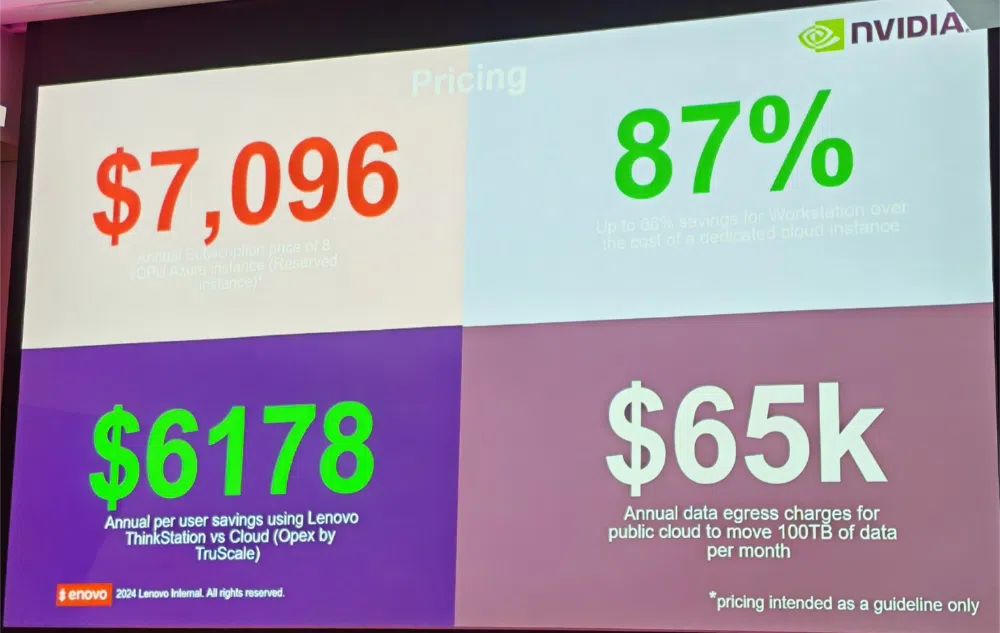
Cost Management: One potential issue with utilising cloud services is the unpredictability of usage patterns and possible data egress fees, leading to increased expenses for certain businesses. In such cases, bringing workloads back in-house may result in more cost control and stability.
Performance Optimisation: Performance optimisation is crucial for certain applications, especially those that demand minimal delay or high data processing speed. In these cases, utilising dedicated on-premises hardware may yield better results. This is especially true for tasks that involve handling large amounts of data.
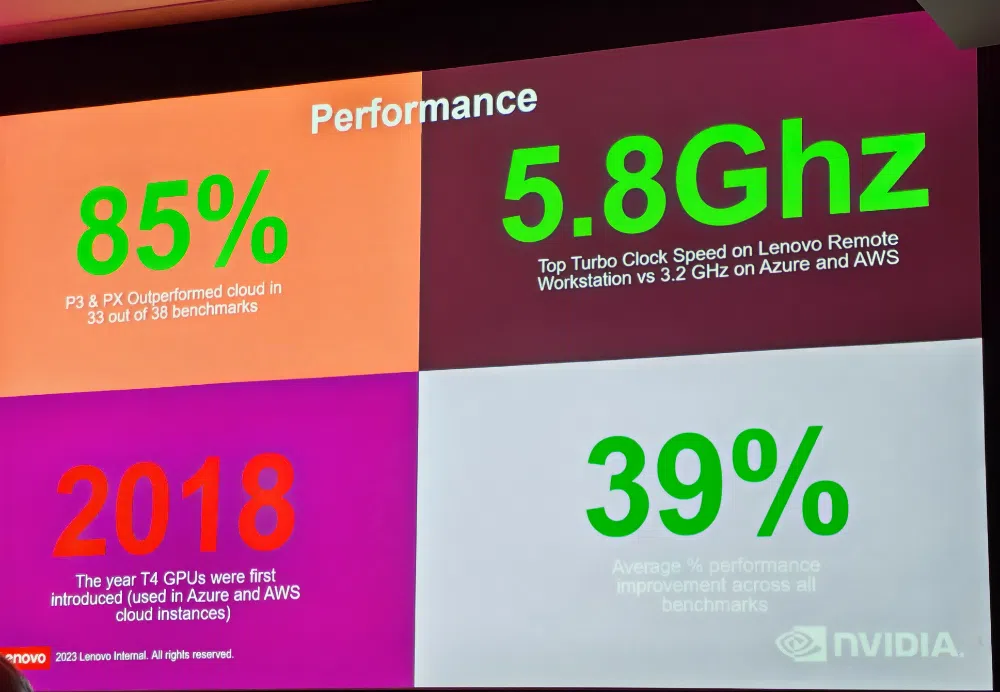
At a recent Lenovo Techworld 24 event it was interesting seeing that the new Lenovo P3 & PX outperformed cloud in 33 out of 38 benchmarks by 85%!
In addition turbo clock speeds run at 5.8GHz on premise compared to 3.2 GHz on Azure or AWS.
Data Privacy and Compliance: Strict data protection laws require increased oversight of how data is stored and handled. Storing data on-premises can streamline adherence to regulations such as GDPR.
Security Concerns: Some organisations prefer the direct oversight of security measures that on-premises infrastructure provides, reducing reliance on third-party cloud providers or products.
Avoiding Vendor Lock-In: Preventing Vendor Lock-In: Relying solely on one cloud provider can restrict adaptability. Repatriation grants businesses the ability to vary their infrastructure and elude potential limitations.
Industry Insights:
A 2024 survey by Barclays revealed that 83% of enterprise CIOs planned to repatriate some or all workloads to on-premises or colocation data centres, a significant increase from 43% in 2020.
Companies like Dropbox and Adobe have undertaken cloud repatriation to better control costs and performance. Puppet
Considerations for Cloud Repatriation:
Predicting costs can range from straightforward to highly complex, depending on the scope and specifics of the environment.
1. Setting Up - Single virtual machines or basic storage requirements can be easily set up with a single service, while more complex multi-service deployments may include containers, databases, AI services, or serverless architecture.
2. Usage Trends - Workloads that have a fixed pattern and usage can be easily managed, such as always-on VMs and steady storage needs. However, dynamic workloads with varying scaling needs like serverless functions, auto-scaling VMs, or batch processing can be more challenging to handle.
3. Regional Price Variations -Providers often have different pricing based on the region. This means that costs for services in the UK may greatly differ from those in the US or Asia, which makes it more complicated to factor these variations into budget planning.
4. Data Transfer Expenses - Data transfer costs are typically minimal when handled within one region but can significantly increase for large volumes of outbound traffic, inter-region transfers, or hybrid-cloud environments.
5. Hidden or Additional Costs: - Simplify your billing process by opting for straightforward compute or storage fees.
Beware of unforeseen expenses associated with API calls in serverless or storage services (such as S3 and Azure Blob Storage), licensing fees for databases or operating systems (such as SQL Server and Windows), and monitoring/management tools (such as Azure Monitor and AWS CloudWatch).
6. Discounts and pricing models - Including on-demand options and a combination of reserved instances, spot pricing, savings plans, or hybrid benefits must be taken into consideration.
7. Application Lifecycle - For the application lifecycle, development and testing environments are relatively simple compared to the complexities of production environments. These critical environments require continuous uptime, redundancy measures, thorough backups, and robust disaster recovery plans.
8. Tools and Resources - While some providers offer helpful tools like AWS Calculator or Azure Pricing Calculator for estimating costs, they may not account for every specific detail such as networking limitations or scaling intricacies.
The pricing models of cloud providers involve numerous SKUs per service, all with varying prices. The potential for unexpected spikes in workload complexity further complicates matters. Additionally, services often utilise usage-based billing, making cost prediction difficult without precise usage patterns.
Assess Your Workload: Thoroughly evaluate your computing, storage, and data transfer requirements.
Make Use of Cloud Costs Calculators: Take advantage of resources such as the Asure Pricing Calculator.
Keep an Eye on Usage: Utilise monitoring and alert systems to monitor and anticipate ongoing expenses.
Seek Guidance from Experts: When dealing with intricate setups, it can be beneficial to seek professional input for cost optimisation and predictions.
Start Small: Begin with a modest deployment and adjust based on observed costs and performance.
By combining meticulous preparation, reliable tools, and consistent monitoring, you can greatly enhance your ability to make accurate cloud costs predictions.
In addition to repatriation of software and services to the cloud our recent article on data centre miniaturisation highlights the falling price and footprint of considering having some applications and storage on premise again.
In conclusion, although cloud computing presents many benefits, companies are now reassessing their individual requirements and potentially returning certain workloads to on-site systems.
