
In today’s rapidly evolving tech landscape, businesses are constantly seeking efficient and flexible solutions to meet their growing IT demands. Two popular architectures are available to solve these issues: Hyper-Converged Infrastructure (HCI) and the classic 3-tier architecture. Each offers unique advantages but understanding them can be daunting. Are you pondering which option best suits your organisation? Let’s dive into these two powerful technologies and unravel their differences, benefits, and how they align with your business needs. Whether you're a small startup or an established corporation, knowing the ins and outs of HCI versus 3-tier architecture could transform the way you approach your IT infrastructure.
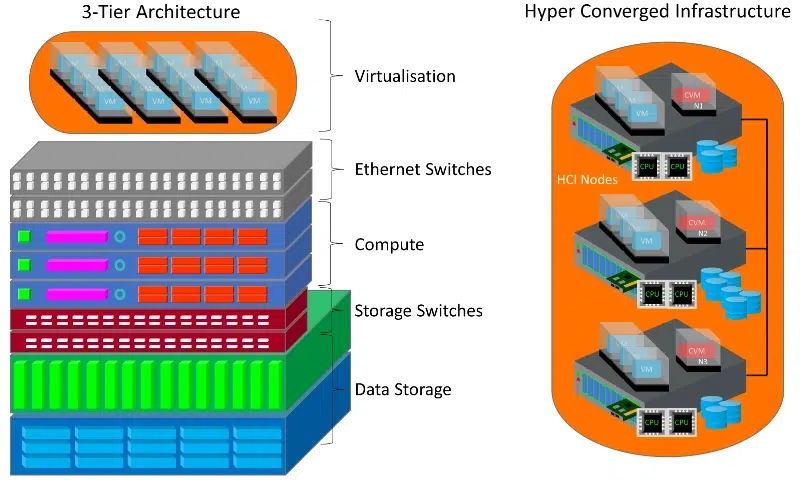
What is 3-tier infrastructure?
3-tier infrastructure keeps the three layers separate:
- Servers (compute) that run the hypervisor and virtual machines
- A storage network, such as Fibre Channel or iSCSI switches
- A shared storage array (SAN) that holds the data
Each layer is bought, managed and upgraded on its own.
3-tier architecture is the traditional method of providing applications and services. Based on servers, networking and data storage. These are used to provide block, level, file data or load a hypervisor such as VMware. Each component in a 3-tier architecture is independently managed i.e. to manage the storage you login to the storage GUI. This structure promotes a flexible and scalable approach by separating the components additional network ports can be added by buying a switch. Each tier can be developed or updated independently without affecting others, enhancing flexibility in deployment and upgrades.
3-tier architecture vs 3-tier infrastructure
The term "3-tier" is used in two ways:
3-tier infrastructure (this page)
Servers, a storage network and a shared storage array (SAN), each bought and managed separately.
3-tier architecture (software)
An application split into a presentation layer, an application layer and a data layer.
When people compare 3-tier with HCI, they mean 3-tier infrastructure.
What is hyper-converged infrastructure (HCI)?
HCI combines compute, storage and virtualisation in one cluster of standard servers. Each server (node) adds its own processors, memory and drives to a shared pool, and the whole cluster is managed from one console. To grow, you add another node.
Hyper-Converged Infrastructure (HCI) is a modern approach to data centre management that combines computing, storage, and networking with a software overlay. The HCI normally runs on certified nodes and the underlying hypervisor software manages all the key components. This integration simplifies the deployment and scaling of resources, allowing organisations to manage their IT infrastructure more efficiently. At its core, HCI eliminates the need for separate hardware components by using virtualisation technology. A hypervisor sits at the heart of this architecture, enabling multiple virtual machines to run on shared physical resources. This streamlining enhances resource utilisation and reduces overhead costs. One significant benefit of HCI is its scalability. Businesses can start with what they need today and expand seamlessly as demands grow. This flexibility makes it an attractive option for companies looking to future-proof their technology investments while maintaining performance and reliability in dynamic environments.
HCI architecture: nodes, hypervisor and storage
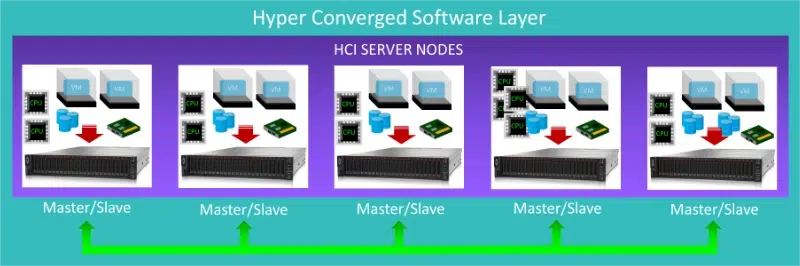
An HCI cluster is built from standard servers called nodes. Each node has its own processors, memory and drives.
- A hypervisor runs on every node and hosts the virtual machines.
- Software pools the drives from all nodes into shared storage and keeps copies of data on more than one node, so the cluster keeps running if a node fails.
- One console manages virtual machines, storage and updates across the cluster.
- To add capacity or performance, you add another node.
HCI hardware is usually sold as servers validated for a specific platform, such as Nutanix, Microsoft Azure Local or VMware vSAN.
Understanding the Differences between HCI and 3-tier
HCI and 3-tier architecture serve different purposes in the IT landscape. HCI, or Hyper-Converged Infrastructure, combines computing, storage, and networking into a single solution. This integration simplifies management and enhances scalability.
On the other hand, 3-tier architecture divides applications into three distinct layers: presentation, application logic, and data storage. Each layer can be managed independently. This separation allows for flexibility in development but can complicate deployment.
When it comes to performance, HCI often delivers speed due to its unified approach. In contrast, the layered structure of 3-tier might introduce latency as requests move between tiers.
Cost is another differentiator. HCI may require higher initial investment but could lead to lower operational costs over time through efficient resource utilisation. Meanwhile, traditional 3-tier setups allow businesses to scale incrementally according to their needs without significant upfront expenditures.
Advantages of HCI over 3-tier Architecture
Hyper-Converged Infrastructure (HCI) offers a streamlined approach to IT management. One of its primary advantages is simplicity. By integrating storage, computing, and networking into a single system, HCI reduces complexity significantly.
Scalability is another key benefit. With HCI, businesses can easily add nodes as their needs grow without overhauling existing infrastructure. This flexibility allows for more efficient resource allocation.
Cost-effectiveness also stands out in HCI solutions. Organisations can save on hardware expenses by minimising the need for separate components typically required in traditional 3-tier setups.
Moreover, HCI often features built-in data protection mechanisms that enhance security and compliance measures right out of the box. This integration simplifies backup processes compared to managing separate systems in a 3-tier architecture.
Deployment speeds are faster with HCI due to its unified platform nature; this means quicker time-to-market for new applications or services.
Advantages of 3-tier Architecture over HCI
3-tier architecture offers distinct advantages that can cater to specific business needs. Its structured approach separates the presentation, application, and data layers. This separation allows for more flexibility in development and deployment.
Scalability is another strong point. Each layer can be scaled independently based on demand. If your user base grows, you can enhance just the presentation layer without overhauling the entire system.
Maintenance becomes easier too. With clear boundaries between layers, troubleshooting problems or upgrading components is straightforward. Developers can focus on enhancing one part without affecting others.
Additionally, 3-tier systems often leverage existing hardware efficiently through a hypervisor setup. This means businesses may not need to invest heavily in new infrastructure immediately while still enjoying enhanced performance.
Security also benefits from this architecture as each tier can enforce its security protocols tailored for specific functionalities or data sensitivity levels.
3-tier vs HCI side by side
| Feature | 3-tier | HCI |
|---|---|---|
| Components | Separate servers, storage network and SAN array | One cluster of servers with storage inside |
| Management | Separate tools for servers, network and storage | One console |
| Growing | Add servers or storage independently | Add nodes (compute and storage together) |
| Upfront cost | Can start small, but several components to buy | Often higher per node, fewer components overall |
| Skills needed | Server, storage and network skills | Mainly virtualisation skills |
| Best for | Large or specialised storage needs, or where compute and storage grow at different rates | Virtualised workloads, branch offices, simpler management |
Replacing servers or storage soon?
Tell us what you run today and we will help you decide between 3-tier and HCI.
Choosing the Right System for Your Business Needs
Selecting the right system for your business involves a careful analysis of specific needs. Start by identifying your workloads and applications. Are they resource-intensive, or do they require flexibility?
Consider scalability as well. HCI systems usually offer robust scaling options due to their integrated nature. This is crucial if you anticipate growth.
Evaluate costs too—both initial investment and long-term maintenance. A 3-tier architecture may have lower upfront costs but could incur higher operational expenses over time.
Think about management complexity as well. HCI tends to simplify management through centralised control, while a 3-tier setup might necessitate specialised skills for each layer.
Don’t forget about vendor support and community resources. Strong backing can help ease transitions and troubleshooting down the road. Tailoring these factors to fit your unique situation will enhance productivity and efficiency in the long run.
Not sure? We can review your current setup and recommend the right option.
Moving from 3-tier to HCI
If your servers and SAN are due for replacement at the same time, it is a good moment to consider HCI. We can review your current setup, compare HCI platforms and help plan the migration.
Conclusion
When it comes to selecting between HCI and 3-tier architecture, the decision largely hinges on your specific business needs. Hyper-converged infrastructure offers simplicity, scalability, and efficiency. It’s particularly beneficial for organisations looking to streamline operations with minimal management overhead.
On the other hand, 3-tier architecture might appeal more to those seeking flexibility in their technology stack. Its modularity allows businesses to customise each layer according to specific requirements or budget constraints.
Understanding both systems' advantages will guide you toward making an informed choice that aligns with your strategic goals. Whether you prioritise ease of use or the ability to finely tune every aspect of your IT environment is key in determining which approach best fits your organisation’s future growth plans.
3-tier vs HCI FAQs
What is the difference between 3-tier and HCI?
3-tier keeps servers, the storage network and the SAN array separate. HCI combines compute and storage in one cluster of servers, managed from one console.
Is HCI cheaper than 3-tier?
Not always. HCI can cost more per node upfront but has fewer components to buy and manage. The right answer depends on your workloads and how you expect to grow.
What is the difference between HCI and CI (converged infrastructure)?
Converged infrastructure packages separate servers, storage and networking into one pre-tested system. Hyper-converged infrastructure goes further and runs storage as software on the servers themselves.
What is the difference between HCI and public cloud?
HCI runs on hardware in your own data centre or office, which you own and control. Public cloud is rented from a provider such as AWS or Microsoft Azure. Some HCI platforms can also run in or connect to public cloud, such as Nutanix Cloud Clusters on AWS and Azure, or Microsoft Azure Local managed through Azure Arc.
What is the difference between HCI and a SAN?
A SAN is a separate storage array shared by servers over a storage network. HCI puts the storage inside the servers and pools it across the cluster, so no separate array is needed.
What are the pros and cons of HCI?
HCI gives you one platform and one console, with no separate SAN to manage, and you grow by adding nodes. The trade-offs are that compute and storage usually grow together, and software licences are often charged per node or per core.
Is HCI a backup?
No. HCI keeps copies of data on more than one node to survive failures, but you still need separate backups.
Which HCI platforms are there?
Common platforms include Nutanix, Microsoft Azure Local and VMware vSAN. We supply them on Lenovo ThinkAgile systems.
Can you help us decide?
Yes. Tell us what you run today and what you want to change, and we will recommend the right option and give you a clear UK quote.
Talk to an infrastructure specialist
Tell us about your servers, storage and plans, and we will recommend 3-tier, HCI or a mix of both.
Prefer email? Write to solutions@fortunadata.com